← Return to Plugins
character ageing effect · beta 0.5.3

Patina

Time adds character.

Patina is a characterful audio effect for adding age, drift, digital wear and spacious atmosphere to instruments, vocals and found sound. Move from subtle warmth and remembered colour to unstable, faded and atmospheric textures without losing the identity of the source.
 macOS AU VST3 Windows · 64-bit BETA
Public betaPatina 0.5.3 is available for testing. Please send repeatable bugs, host-specific issues and musical feedback to help shape the final release.
macOS beta warningThis beta installer is not notarised yet. Gatekeeper may require you to approve the installer in System Settings before first launch.
Windows beta warningThe Windows beta installer is unsigned. Microsoft Defender SmartScreen may show an unknown-publisher warning.
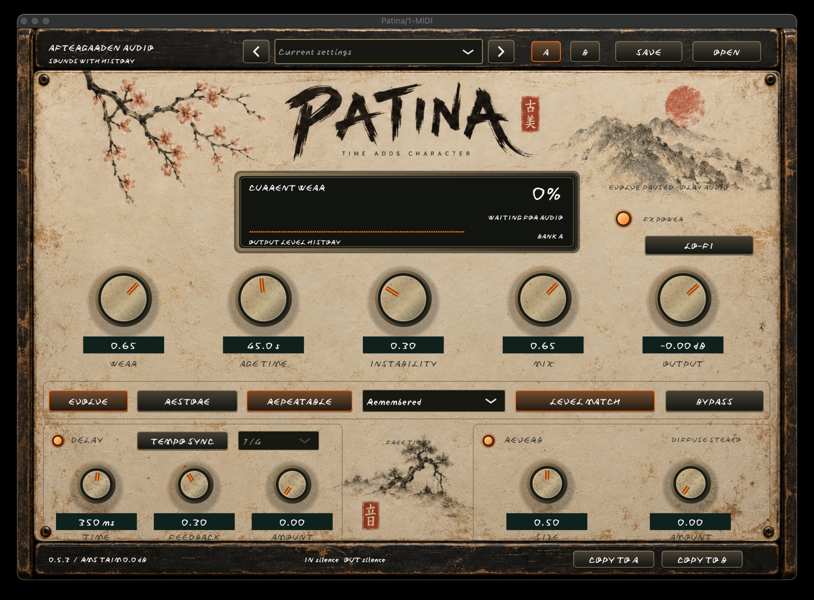
Patina audio plugin interface
Ageing and wearAdd warmth, softness, worn edges and the accumulated character of time.
Pitch drift + flutterIntroduce subtle instability and motion without turning the source into a special effect.
Digital characterAdd restrained lo-fi detail, dust and degradation for more fragile textures.
Delay + reverbPlace the aged signal into soft echoes, rooms and longer atmospheric spaces.
A/B comparisonTry a bolder treatment in the second bank and compare it instantly with the original idea.
The idea

Make a sound feel remembered.

Patina is designed for sounds that need history rather than obvious destruction. Wear sets the amount of ageing, Age Time lets the treatment evolve, Instability adds drift and flutter, and Character changes the overall degree of fading.

Use Mix to preserve the source while letting Delay and Reverb extend the treatment into space. The result can stay nearly invisible or become a deliberately faded, unstable memory of the original signal.

Start subtle

Low Wear and low Instability are often enough on piano, synths and vocals. Raise Mix only after the movement feels right.

Leave headroom

Delay, Reverb and character processing can lift peaks. Use Output to keep the processed sound comfortably below clipping.

Quick starting path

1. Insert Patina after your instrument or audio track.

2. Choose a gentle factory preset.

3. Raise Wear and add a small amount of Instability.

4. Blend with Mix rather than processing at 100% by default.

5. Add Delay and Reverb only when the source needs depth.

6. Copy to B before making a more extreme version.

Sound recipes

Three easy places to begin.

Gentle TapeLow Wear · low Instability · medium Mix. Adds understated movement and softness.
Faded PianoMedium Wear · slower Age Time · soft Reverb. Useful for nostalgic keys and sparse arrangements.
Distant PadRemembered character · more Reverb · gentle Delay. Pushes a pad backwards into the soundstage.
Almost ForgottenHigher Wear · more Instability · lower Output. A more obvious aged and unstable treatment.
time adds character

Download Patina and make a sound feel remembered.

Patina 0.5.3 is currently a public beta for macOS and Windows. The landscape user guide is available above and includes quick-start ideas, control explanations and creative recipes.